
Smooth playback is not proof of stable frame timing. A video can appear continuous while its frame timestamps tell a different story.
For speed, motion, synchronization, and elapsed-time analysis, the "average FPS" label is only the starting point. The real question is:
What are the Presentation Time Stamp (PTS)-derived frame durations across the segment being analyzed?
The check
DIVA's Frame Timing feature is built to answer that question almost instantly:
- Review the file metadata reported by ffprobe/mediainfo/exiftool and note the stated FPS.
- Run Extract Frame Metadata to extract and organize the video's internal frame metadata.
- Run Frame Timing Analysis to quickly analyze and visualize the current file's per-frame presentation timings.
- Compare the reported FPS against the per-frame duration graph.
Example 1: The metadata gives you conflicting numbers.
Start with the most complex case: a file where metadata already gives you two different frame-rate reports, and neither one accurately describes the actual per-frame cadence.
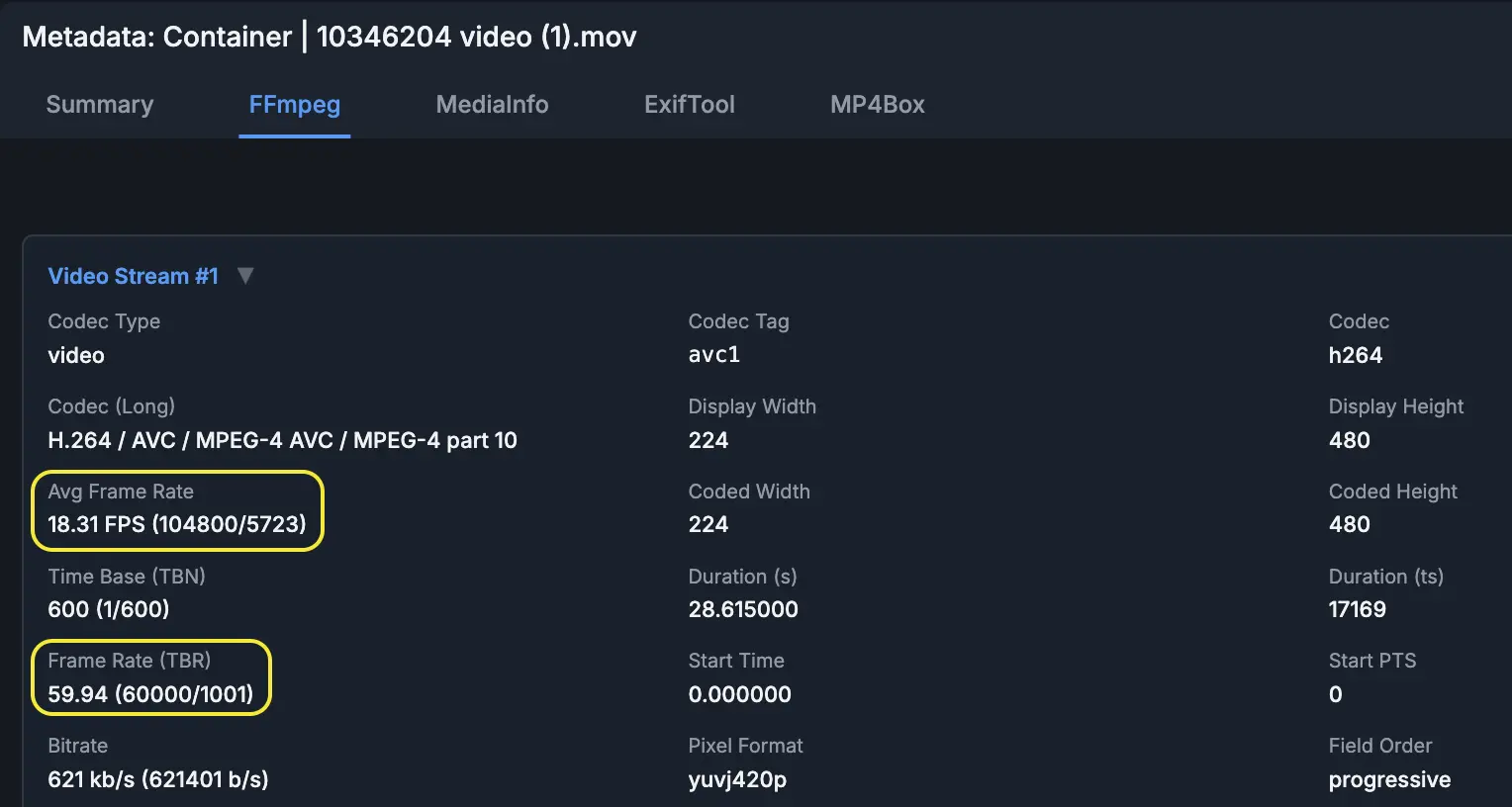
Where do these two frame-rate numbers come from?:
- Avg Frame Rate is FFmpeg's
avg_frame_rate: an average rate for the stream. In this file, FFprobe reports 524 video frames over 28.615 seconds, which works out to about 18.31 fps (524 / 28.615 ~= 18.31). - Frame Rate (TBR) corresponds to FFmpeg's
r_frame_ratevalue in this view: a base frame-rate signal FFmpeg derives from stream timing. FFmpeg describes this as the lowest framerate with which timestamps can be represented accurately, and notes that it is still a guess. Here it is 60000/1001, which means 60,000 frames per 1,001 seconds: about 59.94 fps, or one frame every 0.016683 seconds. In this MOV, the video track uses a 1/600-second time base and includes many short frame durations near 1/60 second. FFmpeg exposes a 59.94-ish base-rate signal, but that is not the measured average cadence, and it is not proof that the video is uniformly 59.94 fps. Far from it.
Let's look at the Frame Timing Analysis results
The Insights panel shows the distribution of frame durations converted back into frame-rate equivalents. In this video, almost 40% of frames are near 59.88 fps, but large portions of the file also land near 10 fps, 30.03 fps, 12 fps, and 14.99 fps. Before looking at the graph, the summary is already telling us that no single FPS value describes this file cleanly.
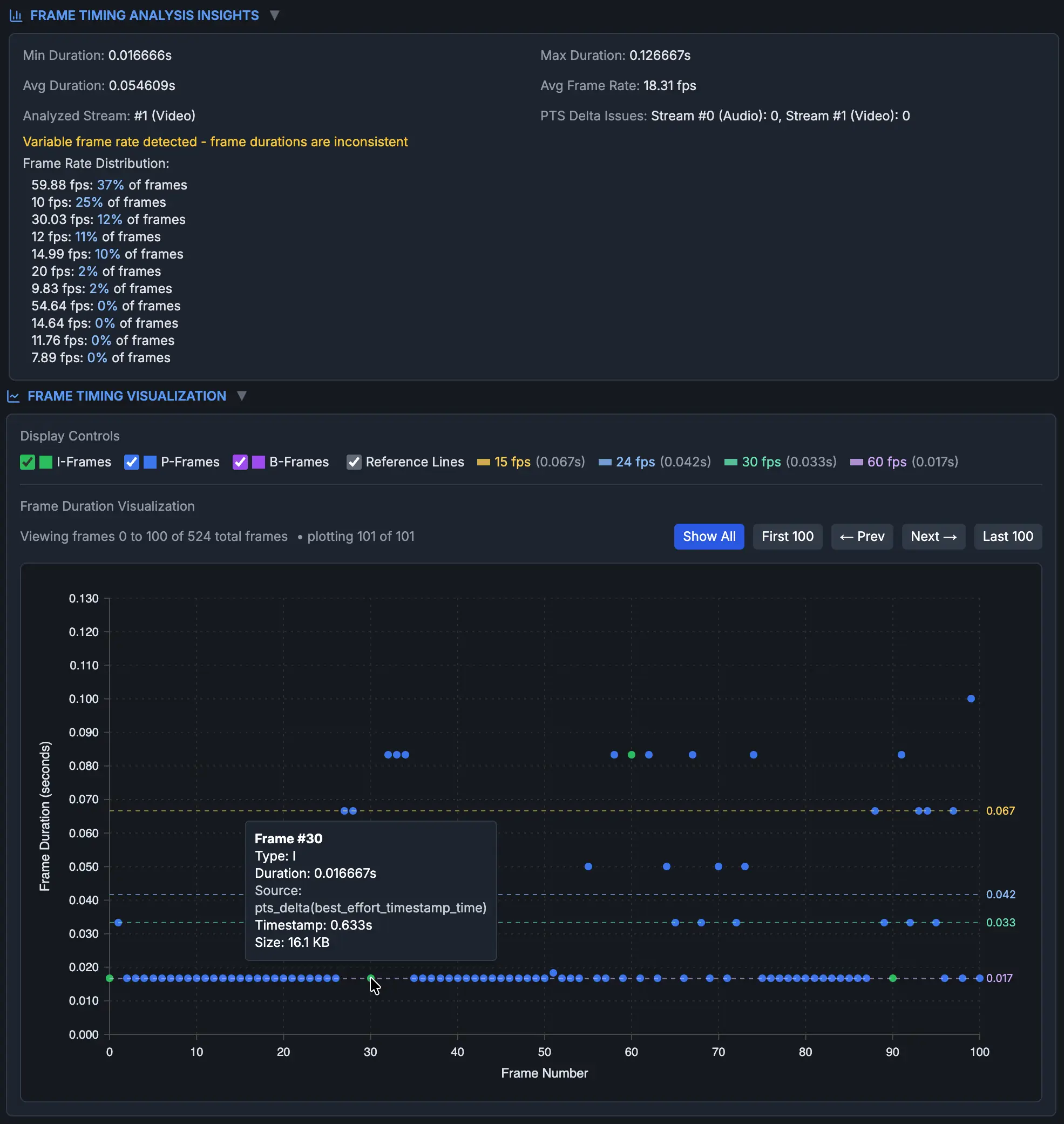
The Frame Timing graph explains why both metadata values need context. This is not a clean 18.31 fps cadence or a clean 59.94 fps cadence. It is a variable-cadence file whose average rate lands at 18.31 fps because different frames have different durations.
This example was created by recording playback of another video on an iPhone with an unknown screen-recording tool. The graph looks consistent with a capture path that is attempting to produce ~60 fps playback, but does not maintain that throughout. That interpretation is supported by the known capture path; the graph itself shows the frame durations present in this file. Most early frames sit near 1/60 second, while other frames land closer to 1/30, 1/15, 1/12, and 1/10 second.
With this new view of the video’s playback timing, an analyst can decide which sections are reliable enough for timing-sensitive analysis, if any.
Example 2: The average looks clean, but it is still an average
Now compare that with a file where the metadata appears much cleaner.
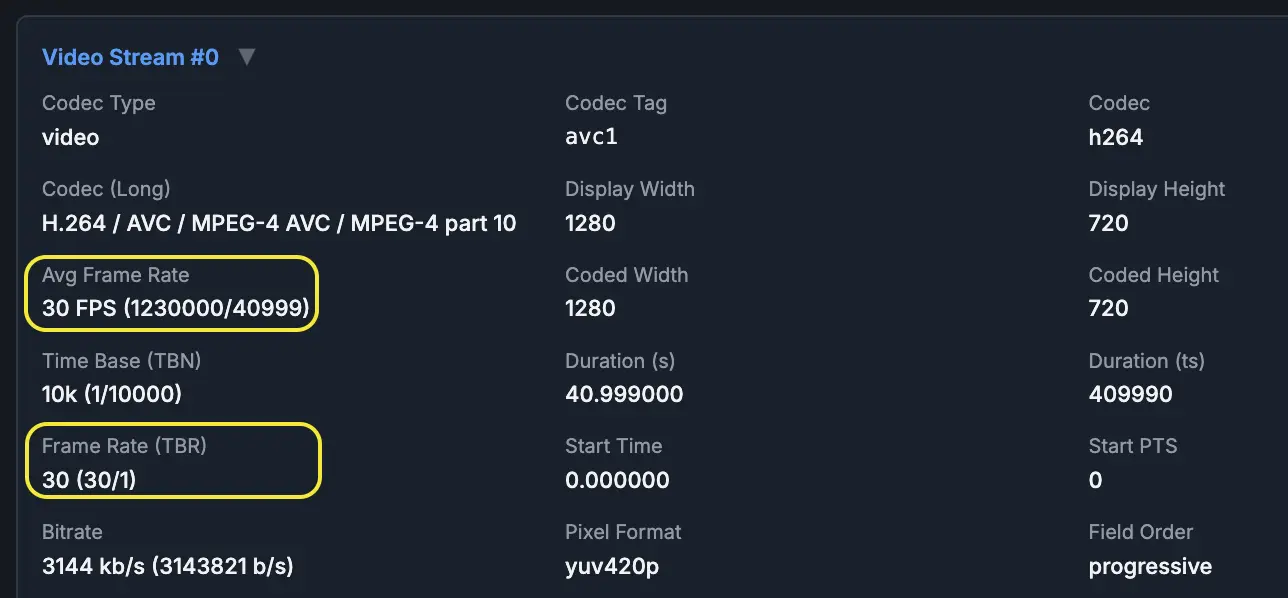
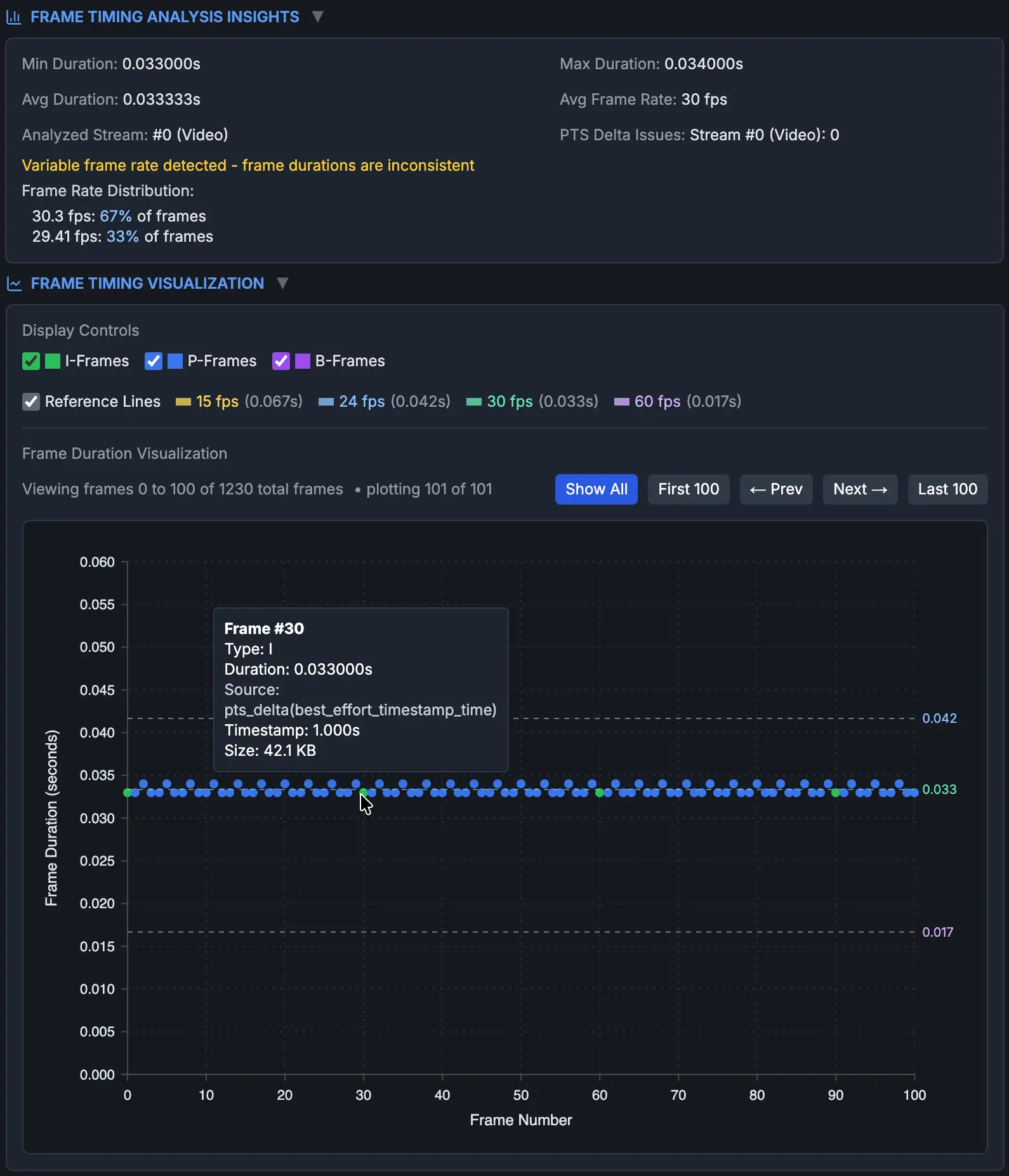
This is much closer to a stable 30 fps file than Example 1. But it still shows why "average FPS" is only an average: the frame durations are split between two nearby groups, with most frames around 0.033 seconds and the rest around 0.034 seconds.
Example 3: The file reports 30 fps, and the cadence is stable
For the third file, FFprobe reports both average frame rate and TBR as 30 fps. The Frame Timing result lines up with that metadata.
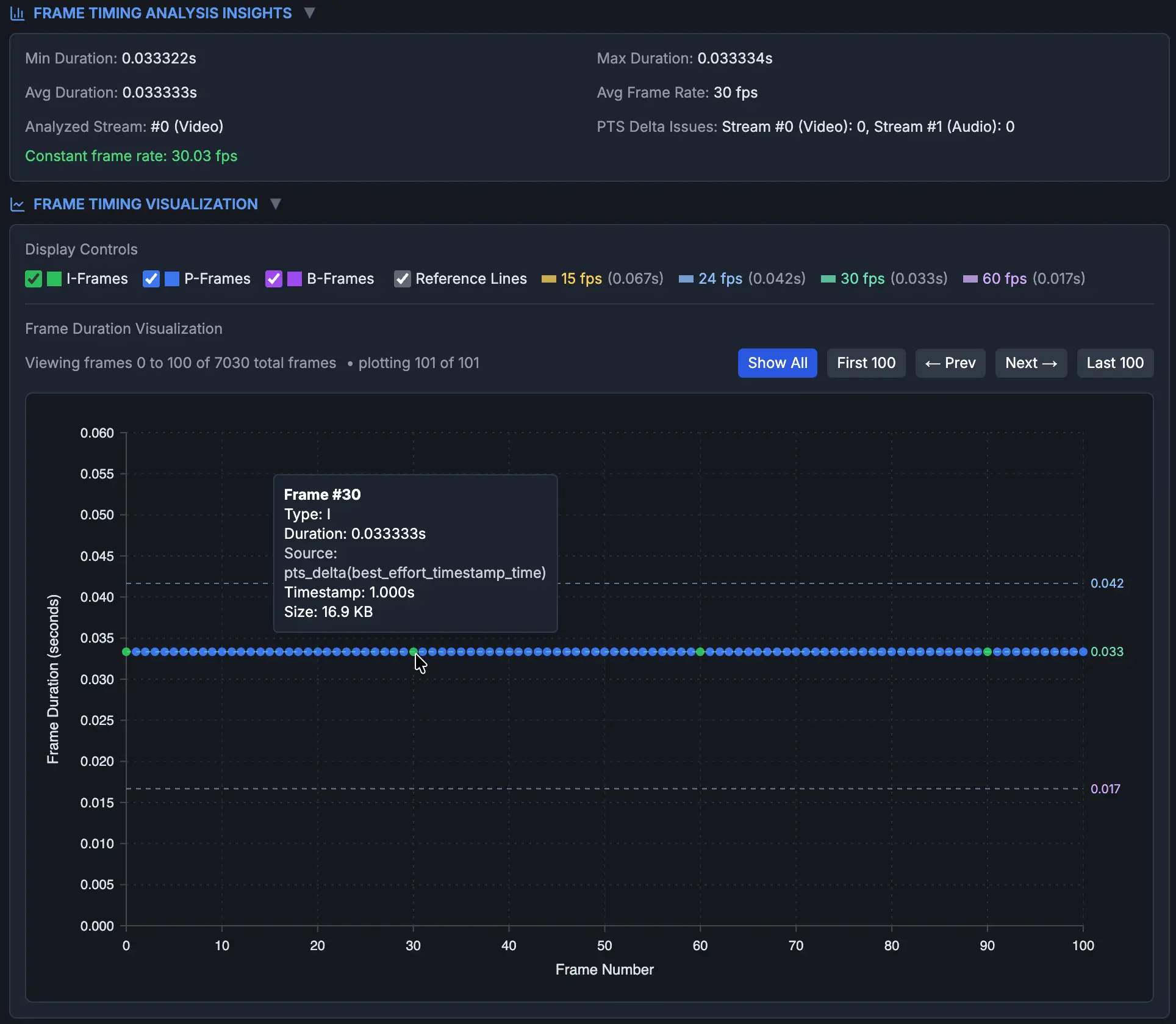
This is the clean case: the metadata says 30 fps, and the plotted frame durations support a stable 30 fps cadence.
Frame Timing describes the timing behavior of the current video file. It does not prove the original camera cadence, the accuracy of the recording device clock, or the exact exposure time of every part of the image.
That distinction matters when the submitted file is a screen recording, export, transcode, or otherwise not the native/original file. The timing graph is still useful for understanding the file in hand, but it should not be treated as proof of the original recording's timing.
What this replaces
DIVA replaces the manual effort of extracting raw per-frame timing data and reviewing frame durations one at a time.
DIVA automates the repetitive extraction and organization work, so the analyst can spend more time on interpretation.
IMPORTANT FORENSIC REMINDER: re-encoding can obscure the original timing
If the video was re-encoded before you received it, we cannot generally recover the original per-frame PTS from a re-encoded file alone. For example, a variable-frame-rate source can be converted to a constant-frame-rate export, replacing the original frame intervals with newly generated ones.
So a stable constant-frame-rate chart does not automatically prove the original recording was stable. It proves the current file presents stable cadence.
Investigators should seek original video whenever possible. When that is not available, a comparison export from the same camera or recording system, with known export settings, can provide useful context about how the video of interest may have been encoded.
For forensic work, native/original media should be preferred whenever available because exports, transcodes, and screen recordings can alter or obscure frame timing and metadata.
Conclusion
A reported FPS value is a starting point, not a timing conclusion.
If a video says it is 30 fps, that may describe the container, the stream, the average rate, the TBR, etc. It does not prove that frames advanced on a clean 1/30-second cadence during the event you are analyzing.
For motion, speed, sync, and elapsed-time questions, we don't assume frame timing.
DIVA Frame Timing quickly gives you per-frame duration, cadence patterns, and exportable data, so your timing argument is based on the current file's frame-timing data instead of a single metadata label.
Sources and further reading
- FFmpeg AVStream documentation:
avg_frame_rate,r_frame_rate, andtime_base. - FFprobe documentation: extracting stream and frame metadata with
-show_entriesand-show_frames. - SWGDE Technical Notes on FFmpeg for Forensic Video Examinations, 16-V-002-3.0: forensic use of FFmpeg/ffprobe and frame-level timing review.
- SWGDE Best Practices for Digital Forensic Video Analysis, 18-V-001-2.0: native/original media, limitations, and forensic video workflow context.
- FFmpeg documentation:
-fps_mode/-vsync, CFR/VFR behavior, timestamp passthrough, frame duplication/drop behavior, and muxer timestamp modification.